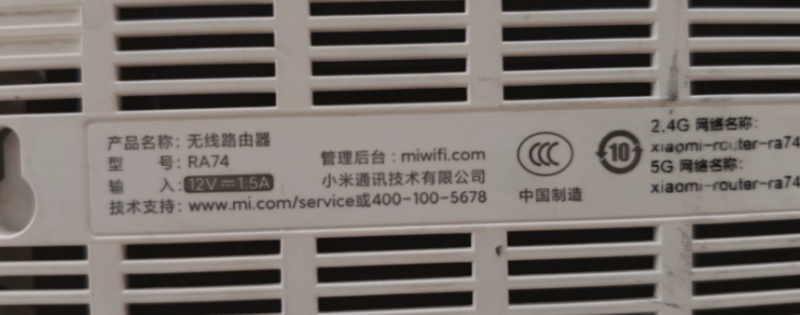


最后一步需要联网安装。AX5400的WAN口插上级可联网的路由器。就可以自动联网了。如果无法联网,是因为你的上级路由器(光猫)后台地址也是192.168.1.1地址冲突了。更换下上级路由器(光猫)的后台地址就行了。
![图片[1]-红米AX5400/RA74路由器刷机教程openwrt+恢复原厂-勇爱设计Netwrok](https://www.getpicion.com/wp-content/uploads/2026/05/image-52.png)
| 项目 | 参数 |
|---|---|
| 型号 | Redmi 路由器 AX5400 |
| 主芯片 | 高通 IPQ5018,双核 A53@1GHz,14nm,带独立 NPU |
| 射频 / 无线 | 5GHz:QCN9024,4×4 MIMO,160MHz,4K QAM2.4GHz:2×2 MIMO,40MHz |
| 信号放大器 | 共 6 路独立 FEM(5GHz×4,2.4GHz×2) |
| 内存 / 闪存 | 512MB DDR3,256MB NAND Flash |
| 交换芯片 | 千兆:EN8850DHE;2.5G:QCA8081 |
第一步备份文件https://wwbtk.lanzouq.com/ijBAt3qvgxmh
mobaxterm下载安装教程
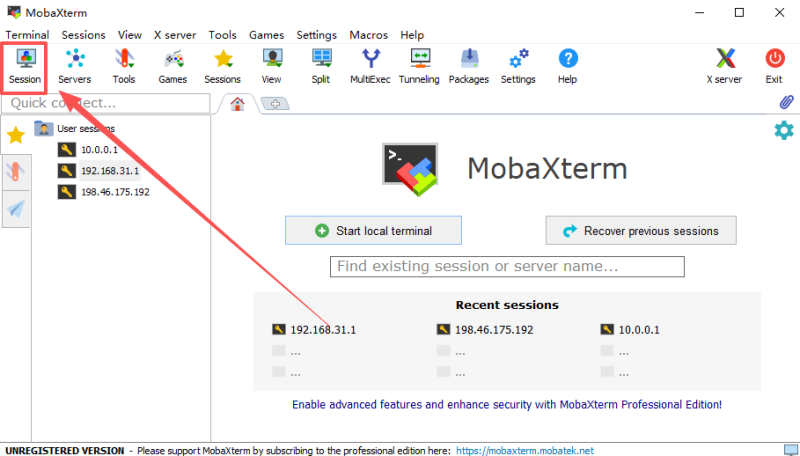
第一步解锁SSH
==========================================================

Xiaomi MiR Patcher


 1 - Set IP-address (current value: 192.168.31.1)
 2 - Connect to device (install exploit)
 3 - Read full device info
 4 - Create full backup
 5 - Install EN/RU languages
 6 - Install permanent SSH
 7 - Install firmware (from directory "firmware")
 8 - {{{ Other functions }}}
 9 - [[ Reboot device ]]
 0 - Exit

Select: 2

device_name = RA74
rom_version = 1.0.63 release
mac_address = e4:54:e8:65:73:12
CountryCode = CN
Enter device WEB password: 12345678
WARN: Exploits "arn_switch/start_binding" not working!!!
Enable smartcontroller scene executor ...
Wait smartcontroller activation ...
___[504]___
Unlock dropbear service ...
Unlock SSH server ...
Set password "root" for root user ...
Enabling dropbear service ...
Run SSH server on port 22 ...
Test SSH connection to port 22 ...

#### SSH server are activated! ####

==========================================================

Xiaomi MiR Patcher


 1 - Set IP-address (current value: 192.168.31.1)
 2 - Connect to device (install exploit)
 3 - Read full device info
 4 - Create full backup
 5 - Install EN/RU languages
 6 - Install permanent SSH
 7 - Install firmware (from directory "firmware")
 8 - {{{ Other functions }}}
 9 - [[ Reboot device ]]
 0 - Exit

Select: 4

Download file: "/tmp/dmesg.log" ....
Download file: "/tmp/mtd_list.txt" ....
Download file: "/tmp/mtd_info.txt" ....
Download file: "/tmp/mtd_fdt.txt" ....
Download file: "/tmp/kcmdline.log" ....
Download file: "/tmp/kver.txt" ....
Download file: "/tmp/dmesg.log" ....
Download file: "/tmp/mtd_list.txt" ....
Download file: "/tmp/mtd_info.txt" ....
Download file: "/tmp/mtd_fdt.txt" ....
Full backup creating...
Download file "./backups/dump_mtd0_0.bin"...
File "backups/mtd0_0SBL1.bin" created!"
Backup of "0SBL1" saved to file "./backups/mtd0_0SBL1.bin"
Download file "./backups/dump_mtd1_0.bin"...
File "backups/mtd1_0MIBIB.bin" created!"
Backup of "0MIBIB" saved to file "./backups/mtd1_0MIBIB.bin"
Download file "./backups/dump_mtd2_0.bin"...
File "backups/mtd2_0BOOTCONFIG.bin" created!"
Backup of "0BOOTCONFIG" saved to file "./backups/mtd2_0BOOTCONFIG.bin"
Download file "./backups/dump_mtd3_0.bin"...
File "backups/mtd3_0BOOTCONFIG1.bin" created!"
Backup of "0BOOTCONFIG1" saved to file "./backups/mtd3_0BOOTCONFIG1.bin"
Download file "./backups/dump_mtd4_0.bin"...
File "backups/mtd4_0QSEE.bin" created!"
Backup of "0QSEE" saved to file "./backups/mtd4_0QSEE.bin"
Download file "./backups/dump_mtd5_0.bin"...
File "backups/mtd5_0QSEE1.bin" created!"
Backup of "0QSEE1" saved to file "./backups/mtd5_0QSEE1.bin"
Download file "./backups/dump_mtd6_0.bin"...
File "backups/mtd6_0DEVCFG.bin" created!"
Backup of "0DEVCFG" saved to file "./backups/mtd6_0DEVCFG.bin"
Download file "./backups/dump_mtd7_0.bin"...
File "backups/mtd7_0DEVCFG1.bin" created!"
Backup of "0DEVCFG1" saved to file "./backups/mtd7_0DEVCFG1.bin"
Download file "./backups/dump_mtd8_0.bin"...
File "backups/mtd8_0CDT.bin" created!"
Backup of "0CDT" saved to file "./backups/mtd8_0CDT.bin"
Download file "./backups/dump_mtd9_0.bin"...
File "backups/mtd9_0CDT1.bin" created!"
Backup of "0CDT1" saved to file "./backups/mtd9_0CDT1.bin"
Download file "./backups/dump_mtd10_0.bin"...
File "backups/mtd10_0APPSBLENV.bin" created!"
Backup of "0APPSBLENV" saved to file "./backups/mtd10_0APPSBLENV.bin"
Download file "./backups/dump_mtd11_0.bin"...
File "backups/mtd11_0APPSBL.bin" created!"
Backup of "0APPSBL" saved to file "./backups/mtd11_0APPSBL.bin"
Download file "./backups/dump_mtd12_0.bin"...
File "backups/mtd12_0APPSBL1.bin" created!"
Backup of "0APPSBL1" saved to file "./backups/mtd12_0APPSBL1.bin"
Download file "./backups/dump_mtd13_0.bin"...
File "backups/mtd13_0ART.bin" created!"
Backup of "0ART" saved to file "./backups/mtd13_0ART.bin"
Download file "./backups/dump_mtd14_0.bin"...
File "backups/mtd14_0TRAINING.bin" created!"
Backup of "0TRAINING" saved to file "./backups/mtd14_0TRAINING.bin"
Download file "./backups/dump_mtd15_0.bin"...
File "backups/mtd15_bdata.bin" created!"
Backup of "bdata" saved to file "./backups/mtd15_bdata.bin"
Download file "./backups/dump_mtd16_0.bin"...
File "backups/mtd16_crash.bin" created!"
Backup of "crash" saved to file "./backups/mtd16_crash.bin"
Download file "./backups/dump_mtd17_0.bin"...
File "backups/mtd17_crashsyslog.bin" created!"
Backup of "crashsyslog" saved to file "./backups/mtd17_crashsyslog.bin"
Download file "./backups/dump_mtd18_0.bin"...
Download file "./backups/dump_mtd18_160.bin"...
File "backups/mtd18_rootfs.bin" created!"
Backup of "rootfs" saved to file "./backups/mtd18_rootfs.bin"
Download file "./backups/dump_mtd19_0.bin"...
Download file "./backups/dump_mtd19_160.bin"...
File "backups/mtd19_rootfs1.bin" created!"
Backup of "rootfs1" saved to file "./backups/mtd19_rootfs1.bin"
Download file "./backups/dump_mtd20_0.bin"...
Download file "./backups/dump_mtd20_160.bin"...
File "backups/mtd20_overlay.bin" created!"
Backup of "overlay" saved to file "./backups/mtd20_overlay.bin"
Download file "./backups/dump_mtd21_0.bin"...
File "backups/mtd21_rsvd0.bin" created!"
Backup of "rsvd0" saved to file "./backups/mtd21_rsvd0.bin"
Download file "./backups/dump_mtd22_0.bin"...
Download file "./backups/dump_mtd22_21.bin"...
File "backups/mtd22_kernel.bin" created!"
Backup of "kernel" saved to file "./backups/mtd22_kernel.bin"
Download file "./backups/dump_mtd23_0.bin"...
Download file "./backups/dump_mtd23_160.bin"...
File "backups/mtd23_ubirootfs.bin" created!"
Backup of "ubirootfs" saved to file "./backups/mtd23_ubirootfs.bin"
Download file "./backups/dump_mtd24_0.bin"...
ERROR: Remote file "/tmp/mtd_dump.bin" not found!

Completed!

==========================================================

Xiaomi MiR Patcher


 1 - Set IP-address (current value: 192.168.31.1)
 2 - Connect to device (install exploit)
 3 - Read full device info
 4 - Create full backup
 5 - Install EN/RU languages
 6 - Install permanent SSH
 7 - Install firmware (from directory "firmware")
 8 - {{{ Other functions }}}
 9 - [[ Reboot device ]]
 0 - Exit

Select: 7

device: "RA74"
img_write = True
Image files in directory "firmware/":
  "firmware/immortalwrt-qualcommax-ipq50xx-xiaomi_redmi-ax5400-initramfs-factory.ubi"
Download file: "/tmp/dmesg.log" ....
Download file: "/tmp/mtd_list.txt" ....
Download file: "/tmp/mtd_info.txt" ....
Download file: "/tmp/mtd_fdt.txt" ....
Download file: "/tmp/kcmdline.log" ....
Download file: "/tmp/kver.txt" ....
Parse all images...
UBI: filetype: b'UBI#'
UBI: Decoding UBIFS...
UBI:   volume: "kernel"          size: 17903616
parse_ubifs = 1
FIT size = 0x110B0AC (17452 KiB)
FIT: name = "ARM64 OpenWrt FIT (Flattened Image Tree)"
FIT: def_cfg: "config@mp03.1"
FIT: def_cfg desc = "OpenWrt xiaomi_redmi-ax5400"
FIT: model = "xiaomi,redmi-ax5400"
FIT: def_fdt: "fdt-1"
FDT: desc = "ARM64 OpenWrt xiaomi_redmi-ax5400 device tree blob"
FDT: type = "flat_dt"
FDT: arch = "arm64"
KRN: desc = "ARM64 OpenWrt Linux-6.12.89"
KRN: type = "kernel"
KRN: arch = "arm64"
KRN: compression = "gzip"
KRN: data = 17843655 bytes
FDT: compatible = ['xiaomi,redmi-ax5400', 'qcom,ipq5018']
FDT: model = "Xiaomi Redmi AX5400"
FDT: dt_part: ['/soc@0/spi@79b0000/nand@0/partitions']
FIT: detect initrd into kernel image
fw_img: 18304 KiB | kernel: 17452 KiB | rootfs: 1 KiB
Download file: "/tmp/bl_0SBL1.bin" ....
Download file: "/tmp/bl_0APPSBL.bin" ....
Download file: "/tmp/env_0APPSBLENV.bin" ....
Download file: "/tmp/env_bdata.bin" ....
Download file: "/tmp/env_0SBL1.bin" ....
current flag_boot_rootfs = 1
install_method = 200
--------- prepare command lines -----------
fw_img: 18304 KiB | kernel: 17452 KiB | rootfs: 1 KiB
------------- flash images -------------
Upload file: "tmp/fw/fw_img.bin" ....
Writing firmware image to addr 0x00A80000 ...
  mtd -e "rootfs" write "/tmp/fw_img.bin" "rootfs"
Download file: "/tmp/mtd18_0_18743296_138042.md5" ....
Run scripts for change NVRAM params...
Boot from firmware [0] activated.
Download file: "/tmp/nvram.txt" ....
The firmware has been successfully flashed!
Send command "reboot" via SSH/Telnet ...
Traceback (most recent call last):
  File "install_fw.py", line 1163, in <module>
    xf.flash()
  File "install_fw.py", line 1120, in flash
    gw.run_cmd("reboot -f", die_on_error = False)
  File "C:\Users\yong\Desktop\小米AX5400刷机openwrt大分区\step1解锁SSH\xmir-patcher-main\gateway.py", line 939, in run_cmd
    channel.close()
  File "ssh2\channel.pyx", line 201, in ssh2.channel.Channel.close
  File "ssh2\utils.pyx", line 148, in ssh2.utils.handle_error_codes
ssh2.exceptions.Timeout

==========================================================

Xiaomi MiR Patcher


 1 - Set IP-address (current value: 192.168.31.1)
 2 - Connect to device (install exploit)
 3 - Read full device info
 4 - Create full backup
 5 - Install EN/RU languages
 6 - Install permanent SSH
 7 - Install firmware (from directory "firmware")
 8 - {{{ Other functions }}}
 9 - [[ Reboot device ]]
 0 - Exit

Select:
root@XiaoQiang:~# cat /proc/mtd
dev:    size   erasesize  name
mtd0: 00080000 00020000 "0:SBL1"
mtd1: 00080000 00020000 "0:MIBIB"
mtd2: 00040000 00020000 "0:BOOTCONFIG"
mtd3: 00040000 00020000 "0:BOOTCONFIG1"
mtd4: 00100000 00020000 "0:QSEE"
mtd5: 00100000 00020000 "0:QSEE_1"
mtd6: 00040000 00020000 "0:DEVCFG"
mtd7: 00040000 00020000 "0:DEVCFG_1"
mtd8: 00040000 00020000 "0:CDT"
mtd9: 00040000 00020000 "0:CDT_1"
mtd10: 00080000 00020000 "0:APPSBLENV"
mtd11: 00140000 00020000 "0:APPSBL"
mtd12: 00140000 00020000 "0:APPSBL_1"
mtd13: 00100000 00020000 "0:ART"
mtd14: 00080000 00020000 "0:TRAINING"
mtd15: 00080000 00020000 "bdata"
mtd16: 00080000 00020000 "crash"
mtd17: 00080000 00020000 "crash_syslog"
mtd18: 02400000 00020000 "rootfs"
mtd19: 02400000 00020000 "rootfs_1"
mtd20: 01f00000 00020000 "overlay"
mtd21: 00080000 00020000 "rsvd0"
mtd22: 002aa000 0001f000 "kernel"
mtd23: 0141a000 0001f000 "ubi_rootfs"
mtd24: 01b20000 0001f000 "data"
root@XiaoQiang:~#
root@OpenWrt:~# cat /proc/mtd
dev:    size   erasesize  name
mtd0: 00080000 00020000 "0:sbl1"
mtd1: 00080000 00020000 "0:mibib"
mtd2: 00040000 00020000 "0:bootconfig"
mtd3: 00040000 00020000 "0:bootconfig1"
mtd4: 00100000 00020000 "0:qsee"
mtd5: 00100000 00020000 "0:qsee_1"
mtd6: 00040000 00020000 "0:devcfg"
mtd7: 00040000 00020000 "0:devcfg_1"
mtd8: 00040000 00020000 "0:cdt"
mtd9: 00040000 00020000 "0:cdt_1"
mtd10: 00080000 00020000 "0:appsblenv"
mtd11: 00140000 00020000 "0:appsbl"
mtd12: 00140000 00020000 "0:appsbl_1"
mtd13: 00100000 00020000 "0:art"
mtd14: 00080000 00020000 "0:training"
mtd15: 00080000 00020000 "bdata"
mtd16: 00080000 00020000 "crash"
mtd17: 00080000 00020000 "crash_syslog"
mtd18: 02400000 00020000 "ubi_kernel"
mtd19: 05180000 00020000 "rootfs"
root@OpenWrt:~#
第二步刷入openwrt最新版
![图片[2]-红米AX5400/RA74路由器刷机教程openwrt+恢复原厂-勇爱设计Netwrok](https://www.getpicion.com/wp-content/uploads/2026/05/image-55.png)
root@OpenWrt:~# apk update
 [https://downloads.openwrt.org/snapshots/targets/qualcommax/ipq50xx/packages/packages.adb]
 [https://downloads.openwrt.org/snapshots/packages/aarch64_cortex-a53/base/packages.adb]
 [https://downloads.openwrt.org/snapshots/targets/qualcommax/ipq50xx/kmods/6.12.91-1-97cfa460a6caecafe438e15beaa79c5e/packages.adb]
 [https://downloads.openwrt.org/snapshots/packages/aarch64_cortex-a53/luci/packages.adb]
 [https://downloads.openwrt.org/snapshots/packages/aarch64_cortex-a53/packages/packages.adb]
 [https://downloads.openwrt.org/snapshots/packages/aarch64_cortex-a53/routing/packages.adb]
 [https://downloads.openwrt.org/snapshots/packages/aarch64_cortex-a53/telephony/packages.adb]
 [https://downloads.openwrt.org/snapshots/packages/aarch64_cortex-a53/video/packages.adb]
OK: 11277 distinct packages available
root@OpenWrt:~# apk add uhttpd luci luci-i18n-base-zh-cn
OK: 26.9 MiB in 178 packages
root@OpenWrt:~# /etc/init.d/uhttpd enable
root@OpenWrt:~# /etc/init.d/uhttpd start
4+0 records in
4+0 records out
root@OpenWrt:~#
Network error: Software caused connection abort
恢复原厂系统
如果恢复原厂系统失败,可以换个win10/11电脑重试
如果还不行。
#联网在线安装解锁工具(openwrt最新v25)
apk update
apk add kmod-mtd-rw
insmod mtd-rw i_want_a_brick=1
#上传原厂备份mtd1_0MIBIB.bin到tmp目录,刷入原厂后再小米恢复
md5sum /tmp/mtd1_0MIBIB.bin
mtd write /tmp/mtd1_0MIBIB.bin /dev/mtd1
© 版权声明
文章版权归作者所有,未经允许请勿转载。
THE END





- 最新
- 最热
只看作者