


![图片[1]-小米路由器4Q/R4C刷机教程openwrt+恢复原厂-勇爱设计Netwrok](https://www.getpicion.com/wp-content/uploads/2026/04/image-33-1024x332.png)
| 项目 | 参数 |
|---|---|
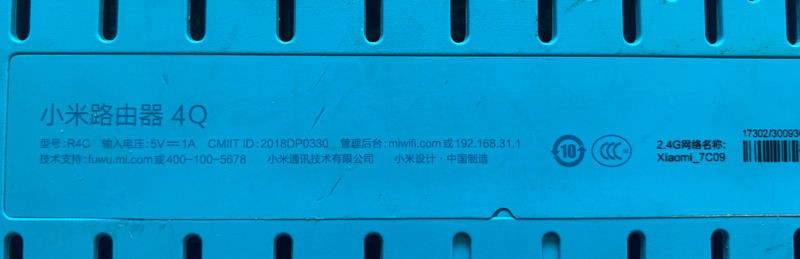
| 型号 | 小米路由器 4Q |
| 发布时间 | 2018 年 6 月 |
| 产品类型 | 智能无线路由器 |
| 无线频段 | 单频 2.4GHz |
| 无线标准 | IEEE 802.11b/g/n |
| 最高速率 | 450Mbps |
| 天线 | 外置 3 根,5dBi 高增益 |
| 处理器 | 高通 QCA9561 @775MHz |
| 内存 / 闪存 | 64MB DDR2 / 16MB NorFlash |
| 网口 | 1× 百兆 WAN,2× 百兆 LAN |
| 电源 | 5V/1A |
| 尺寸 | 200×134.86×178.98mm |
| 颜色 | 蓝色 |
| 系统 | MIWIFI ROM(基于 OpenWRT) |
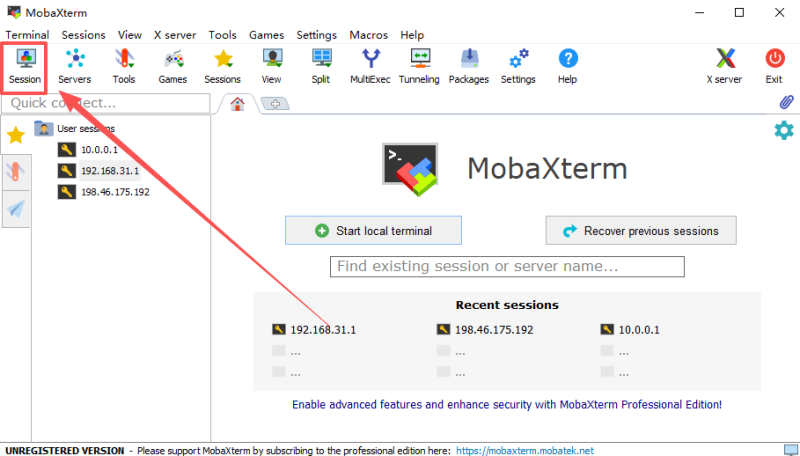
mobaxterm下载教程
小米历史固件

第一步解锁SSH
![图片[2]-小米路由器4Q/R4C刷机教程openwrt+恢复原厂-勇爱设计Netwrok](https://www.getpicion.com/wp-content/uploads/2026/04/image-32-1024x641.png)
第二步刷入openwrt
原厂分区
BusyBox v1.19.4 (2018-05-22 00:44:54 UTC) built-in shell (ash)
Enter 'help' for a list of built-in commands.

 -----------------------------------------------------
       Welcome to XiaoQiang!
 -----------------------------------------------------
  $$$$$$\  $$$$$$$\  $$$$$$$$\      $$\      $$\        $$$$$$\  $$\   $$\
 $$  __$$\ $$  __$$\ $$  _____|     $$ |     $$ |      $$  __$$\ $$ | $$  |
 $$ /  $$ |$$ |  $$ |$$ |           $$ |     $$ |      $$ /  $$ |$$ |$$  /
 $$$$$$$$ |$$$$$$$  |$$$$$\         $$ |     $$ |      $$ |  $$ |$$$$$  /
 $$  __$$ |$$  __$$< $$  __|        $$ |     $$ |      $$ |  $$ |$$  $$<
 $$ |  $$ |$$ |  $$ |$$ |           $$ |     $$ |      $$ |  $$ |$$ |\$$\
 $$ |  $$ |$$ |  $$ |$$$$$$$$\       $$$$$$$$$  |       $$$$$$  |$$ | \$$\
 \__|  \__|\__|  \__|\________|      \_________/        \______/ \__|  \__|


root@XiaoQiang:~# cat /proc/mtd
dev:    size   erasesize  name
mtd0: 01000000 00010000 "ALL"
mtd1: 00030000 00010000 "Bootloader"
mtd2: 00010000 00010000 "Nvram"
mtd3: 00010000 00010000 "Bdata"
mtd4: 00010000 00010000 "crash"
mtd5: 00010000 00010000 "art"
mtd6: 00020000 00010000 "cfg_bak"
mtd7: 00170000 00010000 "overlay"
mtd8: 00e00000 00010000 "firmware"
mtd9: 00d00000 00010000 "rootfs"
login as: root
root@192.168.31.1's password:
┌──────────────────────────────────────────────────────────────────────┐
│ • MobaXterm Personal Edition v25.3 • │
│ (SSH client, X server and network tools) │
│ │
│ ⮞ SSH session to root@192.168.31.1 │
│ • Direct SSH : ✓ │
│ • SSH compression : ✗ (disabled or not supported by server) │
│ • SSH-browser : ✓ │
│ • X11-forwarding : ✓ (remote display is forwarded through SSH) │
│ │
│ ⮞ For more info, ctrl+click on help or visit our website. │
└──────────────────────────────────────────────────────────────────────┘
sh: /usr/bin/X11/xauth: not found
BusyBox v1.19.4 (2018-05-22 00:44:54 UTC) built-in shell (ash)
Enter 'help' for a list of built-in commands.
-----------------------------------------------------
Welcome to XiaoQiang!
-----------------------------------------------------
$$$$$$\ $$$$$$$\ $$$$$$$$\ $$\ $$\ $$$$$$\ $$\ $$\
$$ __$$\ $$ __$$\ $$ _____| $$ | $$ | $$ __$$\ $$ | $$ |
$$ / $$ |$$ | $$ |$$ | $$ | $$ | $$ / $$ |$$ |$$ /
$$$$$$$$ |$$$$$$$ |$$$$$\ $$ | $$ | $$ | $$ |$$$$$ /
$$ __$$ |$$ __$$< $$ __| $$ | $$ | $$ | $$ |$$ $$<
$$ | $$ |$$ | $$ |$$ | $$ | $$ | $$ | $$ |$$ |\$$\
$$ | $$ |$$ | $$ |$$$$$$$$\ $$$$$$$$$ | $$$$$$ |$$ | \$$\
\__| \__|\__| \__|\________| \_________/ \______/ \__| \__|
root@XiaoQiang:~# md5sum /tmp/xiaomi_mi-router-4q-squashfs-sysupgrade.bin
9490888b36e3fdc776626d70efbd4218 /tmp/xiaomi_mi-router-4q-squashfs-sysupgrade.bin
root@XiaoQiang:~# mtd -r write /tmp/xiaomi_mi-router-4q-squashfs-sysupgrade.bin
firmware
Unlocking firmware ...
Writing from /tmp/xiaomi_mi-router-4q-squashfs-sysupgrade.bin to firmware ...
Rebooting ...
Network error: Software caused connection abort
────────────────────────────────────────────────────────────────────────────────
Session stopped
- Press <Return> to exit tab
- Press R to restart session
- Press S to save terminal output to file
opnewrt分区
BusyBox v1.36.1 (2026-04-22 01:24:34 UTC) built-in shell (ash)

.___                               __         .__
|   | _____   _____   ____________/  |______  |  |
|   |/     \ /     \ /  _ \_  __ \   __\__  \ |  |
|   |  Y Y  \  Y Y  (  <_> )  | \/|  |  / __ \|  |__
|___|__|_|  /__|_|  /\____/|__|   |__| (____  /____/
          \/      \/  BE FREE AND UNAFRAID  \/
 -----------------------------------------------------
 ImmortalWrt 24.10.6, r33869-cf234f8de6d5
 -----------------------------------------------------
=== WARNING! =====================================
There is no root password defined on this device!
Use the "passwd" command to set up a new password
in order to prevent unauthorized SSH logins.
--------------------------------------------------
root@ImmortalWrt:~# cat /proc/mtd
dev:    size   erasesize  name
mtd0: 00030000 00010000 "u-boot"
mtd1: 00010000 00010000 "nvram"
mtd2: 00010000 00010000 "boarddata"
mtd3: 00010000 00010000 "crash"
mtd4: 00010000 00010000 "art"
mtd5: 00020000 00010000 "cfg_bak"
mtd6: 00170000 00010000 "overlay"
mtd7: 00e00000 00010000 "firmware"
mtd8: 002c0000 00010000 "kernel"
mtd9: 00b40000 00010000 "rootfs"
mtd10: 00580000 00010000 "rootfs_data"
root@ImmortalWrt:~#
恢复原厂系统
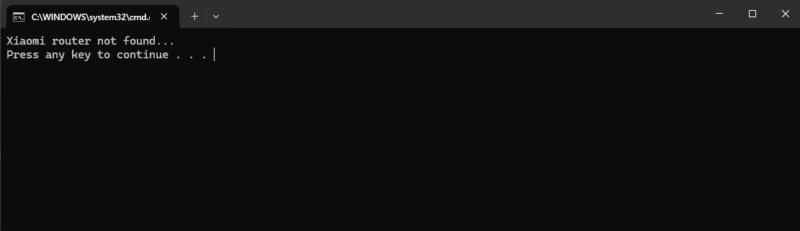
打开小米恢复工具,选择原厂固件。点击下一步。按照提示拔掉路由器电源10秒。按住reset键不松手。重新插入电源。全程别松reset键!等10秒看到灯开始闪,再松手。这时候进入恢复流程。过程大概2分钟。恢复完成后,路由自动重启后,路由器蓝灯闪动。路由器重新插电。浏览器输入192.168.31.1。就可以回到原厂系统
![图片[3]-小米路由器4Q/R4C刷机教程openwrt+恢复原厂-勇爱设计Netwrok](https://www.getpicion.com/wp-content/uploads/2026/04/image-34-1024x562.png)
© 版权声明
文章版权归作者所有,未经允许请勿转载。
THE END




暂无评论内容